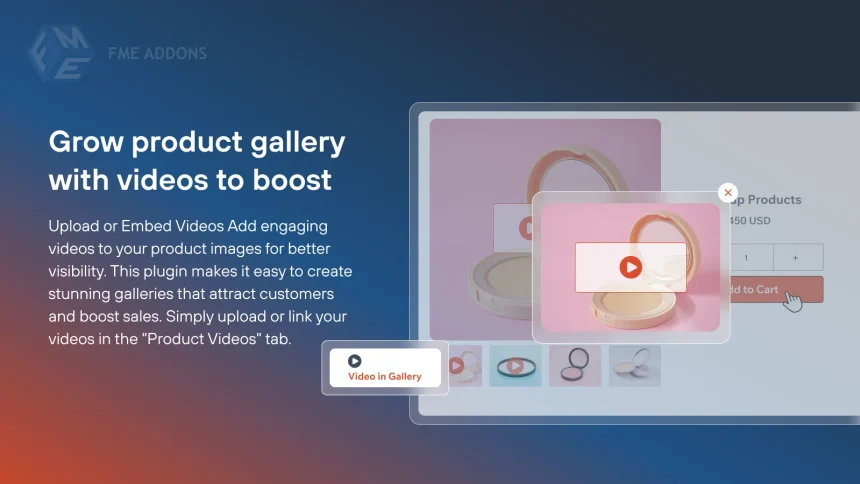
In today’s competitive eCommerce landscape, simply listing products with static images is no longer enough. Customers expect engaging, interactive, and visually rich shopping experiences. This is where a product gallery slider in WooCommerce becomes a powerful tool.
A product gallery slider for WooCommerce allows store owners to present multiple product images and even videos in a clean, navigable, and dynamic format. Instead of overwhelming users with cluttered visuals, sliders organize content in a way that enhances usability and drives conversions.
Below are some of the most impactful benefits of adding a product gallery slider to your WooCommerce store.
1. Enhanced User Experience Through Interactive Navigation
A product gallery slider significantly improves the overall user experience by making navigation intuitive and interactive. Instead of scrolling through a long list of images, users can effortlessly swipe, click, or tap through visuals in a structured format. This streamlined interaction reduces friction and keeps users engaged for longer periods.
When visitors land on a product page, their primary goal is to quickly understand what the product looks like and whether it meets their expectations. A slider enables them to explore multiple images without confusion, offering a smooth browsing experience across devices. This is especially beneficial for mobile users, who prefer swipe-based navigation over excessive scrolling.
Additionally, sliders often include features such as thumbnails, arrows, and pagination indicators, allowing users to jump directly to the images they want to see. This level of control enhances usability and makes the shopping experience more enjoyable.
Ultimately, when customers find it easy to navigate your product pages, they are more likely to stay longer, explore more products, and move closer to making a purchase.
2. Improved Product Visualization and Clarity
One of the biggest challenges in eCommerce is helping customers understand a product without physically interacting with it. A product gallery slider addresses this challenge by enabling the display of multiple high-quality images from different angles and perspectives.
Instead of relying on a single image, you can showcase close-ups, lifestyle shots, zoomed-in details, and even product usage scenarios. This comprehensive visual presentation helps customers gain a clearer understanding of the product’s features, size, texture, and quality.
Better visualization reduces uncertainty, which is one of the main reasons customers abandon purchases. When shoppers can thoroughly examine a product through images, they feel more confident in their buying decision.
Moreover, some sliders support zoom functionality, allowing users to inspect fine details such as fabric texture, build quality, or intricate design elements. This level of detail replicates the in-store experience and bridges the gap between online and offline shopping.
In short, improved product visualization leads to more informed customers—and informed customers are more likely to convert.
3. Increased Conversion Rates and Sales
A well-implemented product gallery slider can directly impact your store’s conversion rates. When customers can easily view and understand a product through engaging visuals, they are more likely to make a purchase.
Visual content plays a critical role in influencing buying decisions. Studies consistently show that customers rely heavily on images when shopping online. By presenting these images in a dynamic slider format, you create a more immersive experience that encourages users to stay longer and interact more with the product.
Sliders also help highlight key selling points. For example, you can position the most attractive or informative images at the beginning of the slider to immediately capture attention. This strategic presentation can guide customers toward making quicker decisions.
Additionally, when combined with features like autoplay or video integration, sliders can tell a compelling visual story about your product. This storytelling approach enhances emotional engagement, which is a key driver of conversions.
Ultimately, the easier and more engaging it is for customers to explore your product, the higher your chances of turning visitors into buyers.
4. Mobile-Friendly Shopping Experience
With a significant portion of online shopping happening on mobile devices, optimizing your WooCommerce store for mobile users is essential. Product gallery sliders are inherently mobile-friendly and designed to support touch gestures like swiping and tapping.
Unlike traditional image layouts that require excessive scrolling or zooming, sliders provide a compact and user-friendly interface for mobile screens. Users can quickly browse through images with simple gestures, making the experience seamless and enjoyable.
Mobile optimization is not just about convenience it directly affects your store’s performance. If users find it difficult to navigate your product pages on mobile, they are likely to leave without making a purchase. A slider eliminates this friction and ensures that your visuals are presented in an accessible and organized manner.
Furthermore, sliders often adapt automatically to different screen sizes, ensuring consistent performance across smartphones, tablets, and desktops. This responsiveness enhances usability and maintains a professional appearance.
By catering to mobile users with an intuitive gallery slider, you not only improve user satisfaction but also increase the likelihood of conversions from mobile traffic.
5. Better Organization of Product Media
Managing multiple images on a product page can quickly become overwhelming if not structured properly. A product gallery slider helps organize these visuals cleanly and systematically, preventing clutter and improving readability.
Instead of displaying all images at once, the slider presents them one at a time within a defined space. This keeps the product page visually appealing and ensures that users are not distracted or confused by too many elements.
Sliders also allow you to categorize and prioritize images. For example, you can place the most important images at the beginning, followed by supporting visuals such as alternate views or detailed shots. This logical flow guides users through the product story in a structured manner.
Additionally, features like thumbnails and navigation controls make it easy for users to jump between images without losing context. This level of organization enhances the overall browsing experience and makes your product pages look more professional.
A well-organized gallery not only improves usability but also reflects positively on your brand, creating a sense of trust and credibility among customers.
6. Ability to Showcase Product Videos
Modern product gallery sliders often support video integration, allowing you to include videos alongside images. This adds a new dimension to your product presentation and significantly enhances engagement.
Videos are one of the most effective ways to demonstrate how a product works, highlight its features, and showcase real-life usage. Unlike static images, videos can convey motion, functionality, and context, making them a powerful storytelling tool.
For example, if you’re selling electronics, a video can demonstrate how the product operates. If it’s clothing, a video can show how the fabric moves or fits. This level of detail helps customers better understand the product and reduces hesitation.
Including videos in your gallery also increases the time users spend on your product pages. The longer they stay, the more likely they are to make a purchase.
By combining images and videos within a single slider, you create a rich multimedia experience that captures attention and keeps users engaged throughout their shopping journey.
7. Reduced Bounce Rates and Increased Engagement
A product gallery slider can play a crucial role in reducing bounce rates by keeping users engaged. When visitors land on a product page and immediately see an interactive slider, they are more likely to explore the content rather than leave.
Interactive elements naturally attract attention and encourage user interaction. Sliders invite users to click, swipe, and explore, creating a sense of involvement. This engagement increases the time spent on your website, which is a positive signal for both conversions and SEO.
When users interact with your content, they are more likely to develop an interest in the product. This increased engagement often leads to deeper exploration of your store, such as viewing related products or reading descriptions.
On the other hand, static and unengaging product pages can lead to quick exits. By adding a slider, you transform your product pages into dynamic experiences that capture and retain user attention.
Lower bounce rates and higher engagement levels ultimately contribute to better overall performance for your WooCommerce store.
8. Enhanced Aesthetic Appeal and Professional Design
First impressions matter, especially in eCommerce. A product gallery slider enhances the visual appeal of your WooCommerce store, giving it a modern and professional look.
Sliders create a clean and polished layout by organizing images within a defined space. This prevents clutter and ensures that your product pages look well-structured and visually appealing. A visually attractive website builds trust and encourages customers to explore further.
Customization options in sliders allow you to match the design with your brand identity. You can adjust colors, layouts, navigation styles, and effects to create a cohesive look across your store.
A professional design not only improves user experience but also strengthens your brand image. Customers are more likely to trust and purchase from a store that looks well-designed and credible.
In a competitive market, standing out visually can make a significant difference. A product gallery slider helps you achieve that by elevating the overall aesthetics of your product pages.
9. Support for Advanced Features Like Zoom and Lightbox
Product gallery sliders often come with advanced features such as zoom and lightbox functionality, which further enhance the shopping experience.
Zoom allows users to inspect product details closely, which is particularly important for items like clothing, accessories, or electronics. Customers can examine textures, materials, and fine details that might not be visible in standard images.
Lightbox functionality enables users to view images in a larger, full-screen mode without leaving the product page. This immersive viewing experience makes it easier to analyze the product and appreciate its features.
These advanced features replicate the in-store experience, where customers can closely examine products before making a purchase. By offering similar capabilities online, you reduce uncertainty and build confidence.
Providing these interactive options shows that you care about user experience and are willing to go the extra mile to meet customer expectations. This can significantly influence buying decisions and improve overall satisfaction.
10. Flexibility and Customization Options
One of the biggest advantages of using a product gallery slider is the level of flexibility it offers. Most slider solutions come with a wide range of customization options, allowing you to tailor the experience to your specific needs.
You can control how images are displayed, choose between different layouts, enable or disable features like autoplay, and adjust navigation styles. This flexibility ensures that the slider aligns perfectly with your store’s design and functionality.
Additionally, you can apply sliders to specific products or categories, giving you control over where and how they are used. This is particularly useful for stores with diverse product types that may require different presentation styles.
Customization also extends to performance optimization. You can fine-tune settings to ensure fast loading times and smooth transitions, which are crucial for maintaining a positive user experience.
By leveraging these customization options, you can create a unique and optimized product gallery that enhances both usability and visual appeal.
Final Thoughts
Adding a WooCommerce Product Gallery Slider to your store is more than just a design upgrade; it’s a strategic move that improves user experience, enhances product presentation, and drives conversions.
From better organization and mobile optimization to advanced features like video integration and Zoom, the benefits are extensive. By implementing a well-designed slider, you create a more engaging and professional shopping experience that meets modern customer expectations.
If you’re looking to elevate your WooCommerce store and maximize its potential, a product gallery slider is an essential feature worth investing in.